An iPhone remote for your Samsung TV.
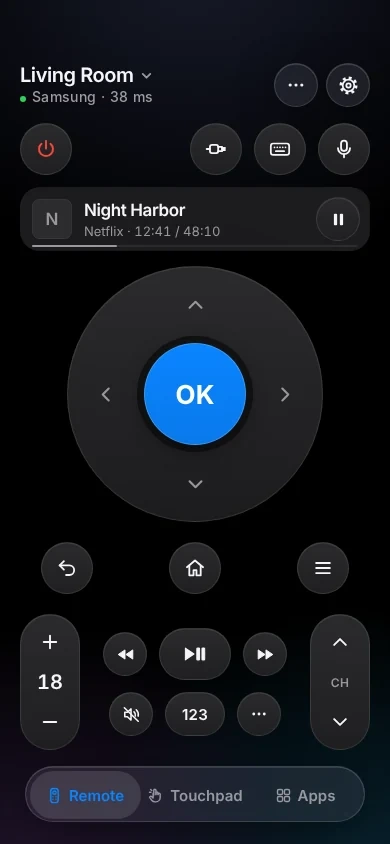
TVkip controls Samsung Smart TVs from 2016 on over your Wi-Fi, including The Frame and Smart Monitors: every button, typing, volume, apps and turning the TV off. You press Allow once on the TV; 2014–2015 sets aren't supported, and 2010–2013 sets get buttons and power off.
TVkip is an independent app. It isn't made by, affiliated with or endorsed by Samsung; the Samsung name only describes which TVs it works with.
What works on each Samsung TV
Samsung puts the year in the model name: a letter such as K (2016), T (2020) or D (2024) after the size, as in UE55TU7100, or after the series on QLED and OLED sets, as in QE55Q80B.
| 2010–2013 (C–F) | 2014–2015 (H, J) | 2016–2019 (K–R) | 2020 and later (T on) | |
|---|---|---|---|---|
| Found automatically | Yes | Yes | Yes | Yes |
| Pairing | Allow once | Not supported | Allow once | Allow once |
| Every button | Yes | No | Yes | Yes |
| Typing | No | No | Most apps | Most apps |
| Volume level | Keys only | No | Yes | Yes |
| Apps list and launch | No | No | Yes | Popular apps you have |
| HDMI inputs | No | No | Source key opens the TV's list | Source key opens the TV's list |
| Turn off / on | Off only | No | Off; on needs a setting | Off; on needs a setting |
| Now playing | No | No | No | No |
The one setting you may need
To turn the TV on from your iPhone
On 2016 and later models, open Settings > General > Network > Expert Settings and turn on Power On with Mobile. Turn on IP Remote there too, if your TV has it. After switching the TV off, wait about a minute before turning it on again. Samsung TVs from before 2014 switch their network off in standby, so they can't be turned on this way.
If the TV refuses the app
Pressed Deny, or the prompt disappeared? The TV remembers that. Open Device Connection Manager:
- 2016–2021: Settings > General > External Device Manager > Device Connection Manager
- 2022 and later: Settings > All Settings > Connection > External Device Manager > Device Connection Manager
In Device List, allow or delete TVkip (or your iPhone), and set Access Notification to First Time Only.
Set it up
- Put your iPhone on the same Wi-Fi as the TV, and turn the TV on.
- Open TVkip and allow Local Network access when iOS asks. Your Samsung TV appears in the list.
- Pick it. The TV asks whether to allow TVkip: press Allow with your Samsung remote within about 30 seconds.
- That's it; the TV won't ask again.
Lost the remote? Many models accept the prompt with the control button on the TV itself, usually under the bottom edge. The full guide is Connecting a Samsung TV.
Honest limits
- 2014 and 2015 sets (H and J series, such as UE48JU6400) aren't supported. They need an encrypted PIN pairing that TVkip doesn't do. The app tells you when it finds one.
- 2010–2013 sets (C, D, E and F series) get the buttons and power off only. Their software has no way for apps to type, open apps, read the volume or switch the TV on.
- Netflix and YouTube ignore phone keyboards on many Samsung TVs. Samsung's own app has the same limit. Tap Use the TV's Keyboard and TVkip types through the on-screen keyboard (how it works).
- Inputs, picture and sound modes are only reachable through Samsung's cloud, which TVkip doesn't use. The Source key opens the TV's own input list.
- The Frame: Turn off holds the power button to switch off fully on 2021–2023 Frames. From 2024, The Frame only goes to Art Mode from the app.
- App list: from 2020, Samsung TVs don't tell apps what's installed, so TVkip shows popular apps and checks which ones your TV has.
What's free, and what Pro adds
Free, for up to two TVs: the whole remote (buttons, touchpad, keyboard, app launcher), Easy Mode, your iPhone's volume buttons, Control Center and Action button controls, the Lock Screen volume widget, the Live Activity, the Apple Watch remote for the TV you're using, basic Siri and 10 casts a day to most Samsung TVs.
Pro adds a third TV and more, screen mirroring, unlimited casting with music and web videos, the full Watch app, more widgets, scenes and Kids Mode. Pro Yearly is US$14.99 a year with a 14-day free trial; Pro Lifetime is US$29.99 once.
Questions
Do I need SmartThings or a Samsung account?
No. TVkip talks to the TV directly over your Wi-Fi, with no account and nothing in the cloud.
How do I know my Samsung TV's year?
Look at the model name on the label at the back or in Settings > Support > About This TV. The letter after the screen size (or after the series, on QLED and OLED sets) is the year: K 2016, M 2017, N 2018, R 2019, T 2020, A 2021, B 2022, C 2023, D 2024.
Why is my 2015 Samsung TV not supported?
Samsung's 2014 and 2015 TVs only accept apps after an encrypted PIN exchange. Supporting it would mean using Samsung's private keys, which we won't do.
Can I turn my Samsung TV on with my iPhone?
Yes, on 2016 and later models with Power On with Mobile turned on. A wired TV with a soundbar on HDMI ARC sometimes ignores the wake signal; try the TV on Wi-Fi.