An iPhone remote for your Vizio TV.
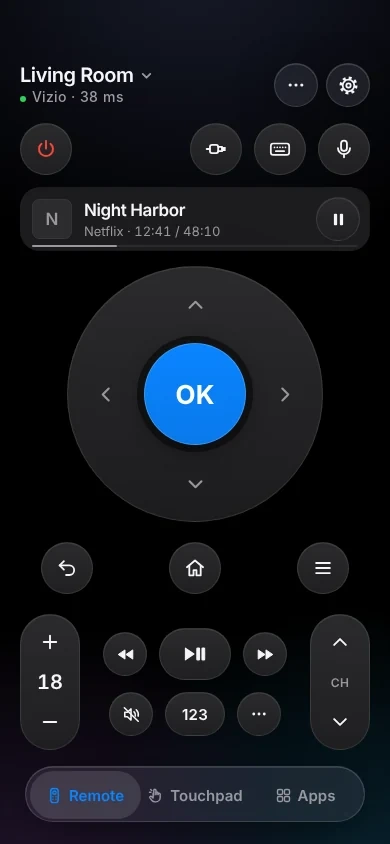
TVkip controls Vizio SmartCast TVs from 2016 on, VIZIO OS TVs and Vizio sound bars over your Wi-Fi: buttons, volume, inputs, popular apps and power. You type a 4-digit PIN from the TV once, and turning the TV on needs Quick Start power mode.
TVkip is an independent app. It isn't made by, affiliated with or endorsed by Vizio or Walmart; the Vizio name only describes which TVs it works with.
What works on each Vizio
Vizio's software changed a few times: the first SmartCast TVs had no on-screen apps, and updates from December 2022 on changed how inputs are switched. TVkip handles each.
| 2016–2017 SmartCast | 2018–2021 SmartCast | 2022 on, VIZIO OS | Sound bars | |
|---|---|---|---|---|
| Found automatically | Yes | Yes | Yes | Most models |
| Pairing | PIN once | PIN once | PIN once | Usually no PIN |
| Every button | Yes | Yes | Yes | Power, volume, input, play |
| Typing | No accents | No accents | No accents | No |
| Volume level | Yes | Yes | Yes | Yes |
| Apps | Cast apps only | Popular apps | Popular apps | No |
| Inputs | Yes | Yes | Yes | Yes |
| Turn off / on | Off; on needs Quick Start | Off; on needs Quick Start | Off; on needs Quick Start | Off; on needs Quick Start |
| Now playing | Yes | Yes | Yes | No |
The one setting you may need
In Eco Mode, a Vizio TV turns its network off while it sleeps, so no app can find it or wake it. Many Vizio TVs start in Eco Mode.
Open Settings > System > Power Mode and choose Quick Start. TVkip can read this setting once paired, and tells you if the TV is still in Eco Mode.
Too many paired phones? Delete the ones you no longer use under Settings > System > Mobile Devices, then pair again.
Set it up
- Turn the TV on with its own remote, and put your iPhone on the same Wi-Fi.
- Open TVkip and allow Local Network access when iOS asks. Your Vizio appears in the list.
- Pick it. A 4-digit PIN appears in a corner of the TV screen. Type it within a minute.
- That's it. TVkip appears on the TV under Settings > System > Mobile Devices, and connects by itself from now on.
The full guide is Connecting a Vizio TV.
Honest limits
- Vizio TVs don't tell apps what's installed. TVkip shows popular apps, using the launch details Vizio publishes for its own app; one that isn't on your TV won't open.
- 2016–2017 SmartCast TVs have no on-screen apps, so only apps that play from a phone over Google Cast can be launched.
- Typing works for letters, numbers and punctuation; accented letters are typed without the accent.
- Sound bars have no screen: power, volume, mute, inputs and play/pause work; there are no apps or typing.
- onn TVs running VIZIO OS haven't been tested yet.
What's free, and what Pro adds
Free, for up to two TVs or sound bars: the whole remote (buttons, touchpad, keyboard, app launcher, inputs), Easy Mode, your iPhone's volume buttons, Control Center and Action button controls, the Lock Screen volume widget, the Live Activity, the Apple Watch remote for the TV you're using, basic Siri and 10 casts a day to Google Cast models.
Pro adds a third device and more, screen mirroring, unlimited casting, the full Watch app, more widgets, scenes and Kids Mode. Pro Yearly is US$14.99 a year with a 14-day free trial; Pro Lifetime is US$29.99 once.
Questions
Do I need a Vizio or Walmart account?
No. TVkip pairs with the TV directly with a PIN, on your Wi-Fi.
Why can't the app turn my Vizio on?
The TV is probably in Eco Mode, which turns its network off in standby. Choose Quick Start under Settings > System > Power Mode.
Does it work with my Vizio sound bar?
Yes, for power, volume, mute, inputs and play/pause. Most sound bars connect without a PIN.