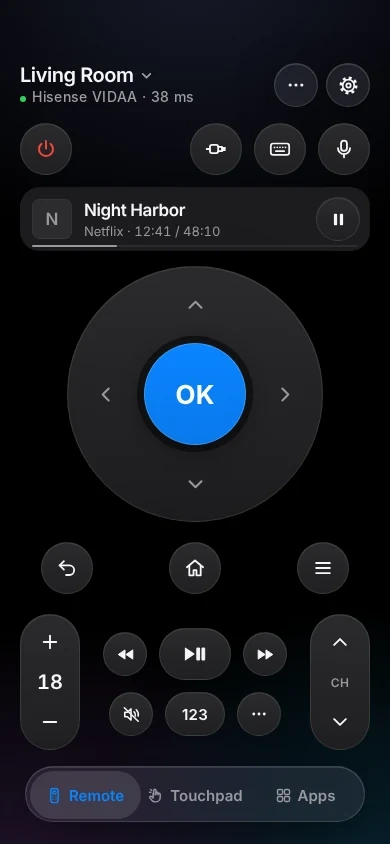
An iPhone remote for your Hisense VIDAA TV.
On most Hisense VIDAA TVs up to 2023, TVkip is a full remote over your Wi-Fi: buttons, volume, apps, inputs and power. Most Hisense TVs from 2024 on let only Hisense's own app use their Wi-Fi remote, so TVkip connects to them in basic mode: turning on, casting and, where the TV allows it, volume.
TVkip is an independent app. It isn't made by, affiliated with or endorsed by Hisense or VIDAA; the names only describe which TVs it works with.
What works on each VIDAA TV
This page is about Hisense TVs running VIDAA, Hisense's own system, and VIDAA models from Toshiba, Loewe and Sharp in some countries. Hisense TVs with Google TV, Android TV or Roku TV connect as those TVs.
| 2017–2021 (VIDAA U2.5–U4) | 2021–2022 (U5, U6) | 2023 (U7) | 2024 and later | |
|---|---|---|---|---|
| Found automatically | With Content Sharing on | With Content Sharing on | With Content Sharing on | With Content Sharing on |
| Full control | Yes | Most models | Some models | Basic mode |
| Every button | Yes | Yes | Where full control works | No |
| Typing | Not yet | Not yet | Not yet | No |
| Volume level | Yes | Yes | Yes | Where the TV allows it |
| Apps list and launch | Yes | Yes | Where full control works | No |
| Inputs | Yes | Yes | Where full control works | No |
| Turn off / on | Off; on needs Wake on LAN | Off; on needs Wake on LAN | Off; on needs Wake on LAN | On, with Wake on LAN |
| Now playing | Yes | Yes | Where full control works | No |
The one setting you may need
Phones can reach a VIDAA TV only with Content Sharing on:
- Up to 2023: Settings > System > Application Settings > Content Sharing
- 2024 models: Settings > Connection > Mobile Device Connection
- 2025 models: Settings > Connection > Multimedia Device Connection
If the TV asks, accept its privacy terms (Settings > Support > Disclaimer and Privacy).
To turn the TV on from your iPhone
Turn on Wake on LAN (network cable) and Wake on Wireless Network (Wi-Fi) in Settings > Network (2024 and later: Settings > Connection > Network). Keep Fast Power On on in Settings > System > Advanced Settings.
Set it up
- Turn on Content Sharing (above) and put your iPhone on the same Wi-Fi as the TV.
- Open TVkip and allow Local Network access when iOS asks. Your Hisense TV appears in the list.
- Pick it. Most TVs show a 4-digit code; type it in the app. Older TVs connect without a code.
- If the TV accepts only Hisense's app, TVkip connects in basic mode by itself and tells you so.
Sign-in refused? Check the TV's date and time (Settings > System > Time); with the right time, many TVs connect fully. The full guide is Connecting a Hisense VIDAA TV.
Honest limits
- 2024 and later: basic mode. Most of these TVs, and some earlier ones after an update (seen on U8H, U7K, U8K and E7K PRO), accept their Wi-Fi remote only from Hisense's own app. TVkip then uses the open standards every VIDAA TV has: turning on, casting photos, videos and music, and volume and mute where the TV reports them. The arrows, Home, apps, inputs and keyboard are hidden. Full control may come through Apple Home in a later version; we can't promise a date.
- 2023 sets get full control only if the TV accepts TVkip's connection; otherwise they use basic mode.
- Typing isn't offered yet on any VIDAA TV, until we've confirmed how the TV handles it.
- Apps open at their start screen; VIDAA has no documented way to open a specific show.
- Toshiba, Loewe and Sharp VIDAA sets are treated like Hisense; we haven't confirmed every model.
What's free, and what Pro adds
Free, for up to two TVs: everything your TV allows (the remote, or basic mode), Easy Mode, your iPhone's volume buttons, Control Center and Action button controls, the Lock Screen volume widget, the Live Activity, the Apple Watch remote for the TV you're using, basic Siri and 10 casts a day.
Pro adds a third TV and more, screen mirroring, unlimited casting with music and web videos, the full Watch app, more widgets, scenes and Kids Mode. Pro Yearly is US$14.99 a year with a 14-day free trial; Pro Lifetime is US$29.99 once. If your TV is in basic mode, try the free features first.
Questions
Why does my 2024 Hisense TV only work in basic mode?
Hisense's newer software accepts Wi-Fi remote commands only from Hisense's own app, which holds a certificate that only Hisense may use. TVkip won't copy it, so it uses the open standards instead.
How do I know if my Hisense TV runs VIDAA?
The home screen says VIDAA, and the settings show a Content Sharing or Mobile Device Connection option. If your TV runs Google TV or Roku TV, use the Google TV or Roku page.
Can I type searches on my Hisense TV?
Not yet. Typing is off on VIDAA TVs until we've confirmed it works the way you'd expect.
Does it work with Toshiba VIDAA TVs?
Toshiba's VIDAA models are treated like Hisense ones and should connect the same way. Not every model has been confirmed.