Your wrist is the remote.
TVkip puts a TV remote on your Apple Watch, free: the arrows, OK, back, home, play/pause, power and volume on the Digital Crown, for the TV you're using on your iPhone. It works with every TV platform TVkip supports, with no pairing on the Watch.
TVkip is an independent app. TV brand names on this page only describe compatibility; TVkip isn't affiliated with or endorsed by any TV maker.
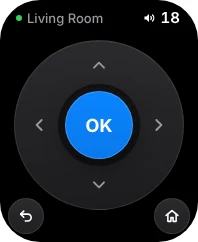
What it does
- Arrows and OK to move around the TV's menus.
- Back, Home, play/pause and power, without reaching for your phone.
- Volume on the Digital Crown. Turn it, and the TV follows step by step. Where the TV reports its level, the Watch shows it.
The Watch uses the TVs you've set up on your iPhone. There's nothing to pair again.
Which TVs it works with
The Watch sends the same commands as the iPhone remote, so it works wherever the remote does.
| TV | Watch remote | Shows the level |
|---|---|---|
| Samsung | 2016 on, and 2010–2013; not 2014–2015 | 2016 on |
| LG webOS | 2014 on | Yes |
| Roku | Yes | No |
| Google TV / Android TV | Yes | TVs; not boxes |
| Sony BRAVIA | 2013 on | Yes |
| Vizio | Yes | Yes |
| Hisense VIDAA | Full up to 2023; power and volume in basic mode | Where the TV reports it |
| Fire TV | Fire OS; not Vega OS sticks | Fire TV smart TVs |
| Apple TV | Yes | No |
Set it up
- Set up your TV in TVkip on your iPhone first.
- On your iPhone, open the Watch app, find TVkip and tap Install.
- Open TVkip on the Watch. It controls the TV you're using on your iPhone.
The Watch talks to the TV over Wi-Fi, so it needs to be on the same network, or near your iPhone. See Apple Watch remote.
What's free, and what Pro adds
Free: the Watch remote for the TV you're using on your iPhone, with Digital Crown volume. No trial, no time limit.
Pro turns it into the full Watch app: pick any of your TVs on the Watch, open apps on the TV, and add complications to your watch face. Pro Yearly is US$14.99 a year with a 14-day free trial; Pro Lifetime is US$29.99 once.
Honest limits
- The free Watch remote follows the TV you last used on your iPhone. Switching TVs on the Watch is part of Pro.
- There's no keyboard or touchpad on the Watch; use your iPhone for typing.
- The Watch needs the TV's Wi-Fi, or your iPhone nearby.
- Turning a TV on needs the same TV setting as on the iPhone (how to turn your TV on).